

In today’s fast-paced business environment, organizations need more than just historical reports—they need intelligent insights that drive proactive decision-making. SAP Analytics Cloud (SAC) has evolved from a traditional business intelligence tool into a comprehensive, AI-powered platform that’s revolutionizing how enterprises analyze data, plan operations, and make strategic decisions.
With the integration of generative AI capabilities and SAP’s intelligent copilot Joule, SAC now enables business users to interact with complex data using natural language, automate tedious analytical tasks, and uncover insights that were previously hidden in mountains of information. Whether you’re a data analyst, business planner, or executive, understanding these AI capabilities is essential for staying competitive in 2025 and beyond.
In this comprehensive guide, we’ll explore how artificial intelligence is embedded throughout SAP Analytics Cloud, examine real-world applications, and provide practical insights to help you leverage these powerful capabilities in your organization.
Meet Just Ask & Joule: Your AI – Powered Business Companions
SAP Analytics Cloud offers two complementary AI features that transform data interaction: Just Ask and Joule. Both use natural language processing but serve different purposes in your analytics workflow.
Just Ask: Instant Data Exploration
Just Ask is SAC’s native search feature that turns questions into visualizations. Type “Show sales by region last quarter” and instantly get charts—no technical skills required.
What Makes Just Ask Powerful:
- Queries index SAC and Datasphere models directly from the home page.
- Smart suggestions and autocomplete appear as you type.
- Administrators control which models are searchable for governance.
- Results can switch between charts and tables, or export to CSV.
- Released in Q1 2024.
How to Use Just Ask:
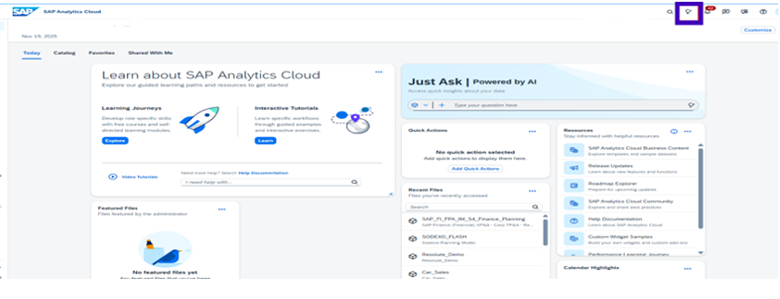
Step 1: The Just Ask icon appears in the top-right corner of SAP Analytics Cloud (highlighted in the interface).
Step 2: Simply select your data model and type your question in natural language.
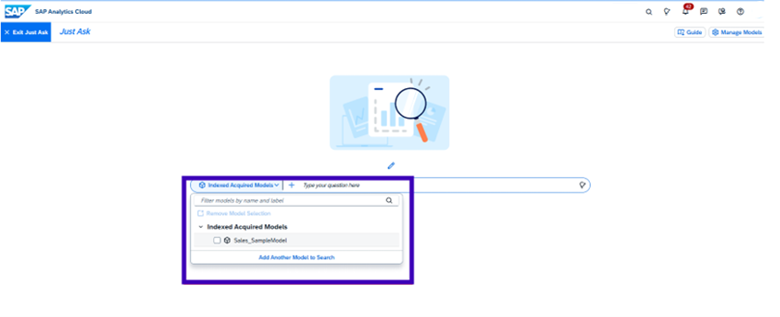
Or, if you want to add another model to search, click the button “Add Another Model to Search” and select your model to perform the search.
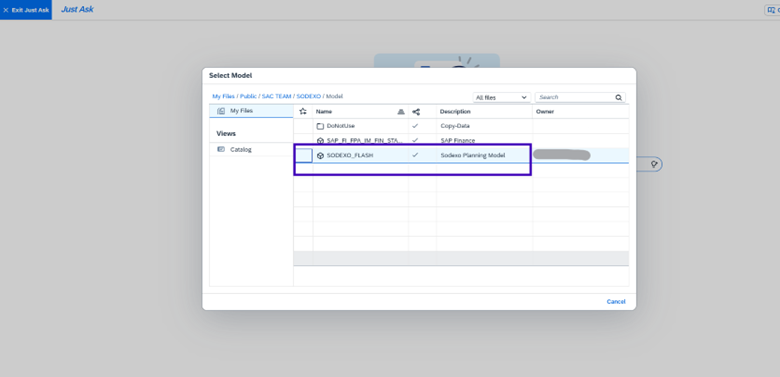
Step 3: After selecting your model, enter your search.
Example: Enter the prompt “Create a bar chart for Total Unit Operating Cost based on versions” in the text box, and Just Ask instantly generates the visualization with your specified dimensions and measures. The prompt appears in the query box, and the results display immediately as an interactive chart.
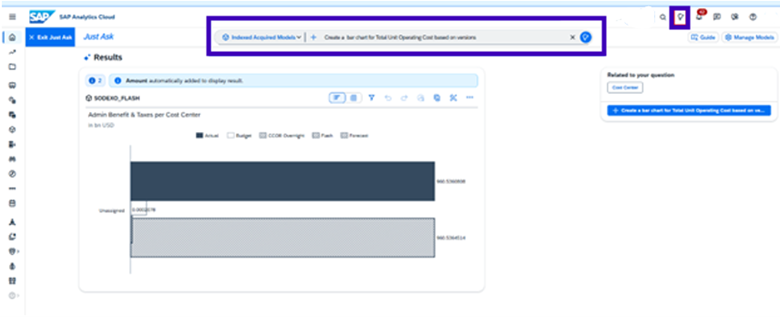
Just Ask in SAC
Joule: Your Enterprise AI Copilot
Joule is SAP’s comprehensive AI assistant that works across the entire SAP ecosystem—not just Analytics Cloud. It remembers your conversation context and assists beyond simple queries.
Joule Goes Further:
- Maintains conversation context for iterative refinement.
- Generates complex formulas from plain English descriptions.
- Creates chart summaries automatically for presentations.
- Writes scripts and builds dashboards through conversation.
- Accessible from any Joule-enabled SAP application.
- Supports English, French, German, Italian, and Spanish.
- Released in Q2 2025 for analytics.
How to Use Joule
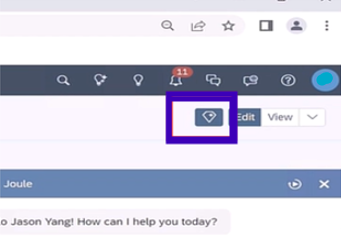
Step 1: The Joule icon is in the top-right corner of your SAC story interface.
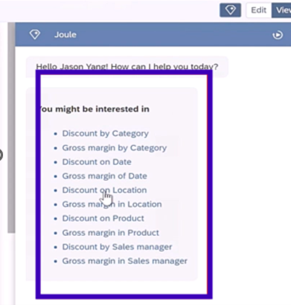
Step 2: Joule provides intelligent suggestions and understands your requirements within the context of your current work. If you need select any one of these otherwise ask your requirements or questions.
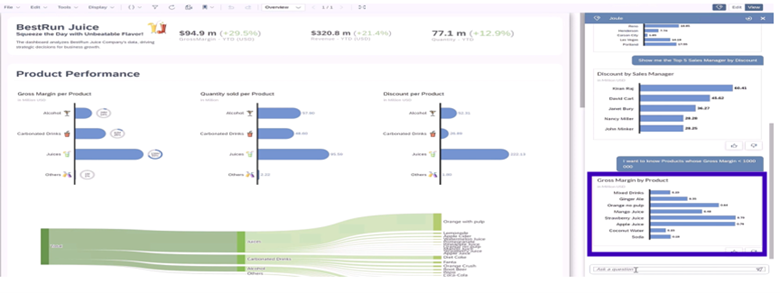
Example: Type the prompt “I want to know Products whose Gross Margin < 1000000” and Joule analyzes your data, applies the filter condition, and generates a bar chart visualization displaying the results. The AI understands conditional logic and creates appropriate visuals without manual chart configuration.
Step 3: Provides the result based on the requirement and we can use our story.
Joule AI in SAC
Roadmap of Joule:
SAP is rapidly expanding Joule across its cloud ecosystem. Here’s the quick view:
Joule is becoming the central AI experience in SAP — bringing faster insights, easier analytics, and smarter decisions to everyday users.
- Now: Joule is available in SAC and several SAP cloud solutions including S/4HANA Cloud.
- Early 2025: Wider rollout of Joule’s natural-language insights in SAC.
- Mid–Late 2025: Broader integration across finance, supply chain, HR, procurement, and more.
- Future Goal: A unified AI assistant across all major SAP cloud applications.
Joule is becoming the central AI experience in SAP — bringing faster insights, easier analytics, and smarter decisions to everyday users.
How Just Ask and Joule Support End-To-End Workflows
SAP offers two intelligent assistants — Just Ask and Joule — designed to simplify analytics and decision-making across the SAP ecosystem. While they share the same underlying analytical engine, each supports users in different parts of their workflow.
Quick Comparisons:
| Feature | Just Ask | Joule |
| Scope | SAC only | All SAP cloud apps |
| Context Memory | Each query is independent | Remembers conversation |
| Capabilities | Query & visualize | Query + formulas + scripts + dashboards |
| Access | SAC home page | Any Joule-enabled SAP app |
| Trial Version | Available | Not Available |
The Connection:
Joule’s analytical strength is built on the Just Ask engine. When administrators index models in Just Ask, those models automatically become accessible to Joule — enabling both tools to deliver fast, accurate insights.
Workflows
Just Ask Workflow Example
- User goal: Quickly explore a dataset.
- Action: Opens Just Ask in SAC.
- Query: “Show sales for last quarter.”
- Result: Chart appears instantly.
- Next step: User filters or exports insight to a story.
- Business outcome: Fast ad-hoc insight for decision-making.
Joule Workflow Example
- User goal: Understand a performance issue across systems.
- Action: Opens Joule in S/4HANA Cloud.
- Query: “Why is West region revenue down?”
- Result: Joule analyzes multiple SAP cloud apps.
- Next step: “Suggest actions / create replenishment request.”
- Business outcome: Insight → Recommendation → Action.
Real-Time Workflow Examples in SAC
Just Ask Workflow – Quick Sales Analysis in SAC
Scenario: A sales manager wants to quickly identify underperforming products for the last quarter.
Steps:
- Manager opens SAC and clicks on Just Ask.
- Types: “Show me total sales by product category for Q4.”
- Just Ask instantly generates a bar chart showing sales per category.
- Manager notices that “Category A” has unusually low sales.
- Applies a filter to focus on APAC region.
- Export the chart to a SAC story for a team discussion.
Outcome: Fast ad-hoc insights, no manual chart configuration, enabling the manager to quickly detect trends and take immediate action.
Joule Workflow – Cross-Application Decision Making
Scenario: The supply chain head wants to investigate why certain products are low in stock and wants to take corrective action across systems.
Steps:
- Opens Joule in S/4HANA Cloud.
- Asks: “Why is the West region inventory below target for Product X?”
- Joule analyzes data across SAC, S/4HANA, and inventory management systems.
- Generates a summary: “Sales demand higher than expected; production delays noted; lead time extended by 5 days.”
- Manager asks: “Create a replenishment order for low-stock products.”
- Joule drafts the order in the system, ready for approval.
Outcome: Insight-to-action workflow — the manager quickly identifies the problem, understands the cause, and initiates corrective action across multiple SAP systems, all from a single conversational interface..
This example shows the difference in scope:
Just Ask: Fast insights within SAC for ad-hoc queries.
Joule: End-to-end cross-application workflow, from insight to operational action.
When to Use Each Tool
| Just Ask | Joule |
| Quick ad-hoc queries within SAC. | Cross-application analytics. |
| Fast data exploration from the home page. | Complex formula creation and conditional logic. |
| Simple visualizations from indexed models. | Conversational, iterative analysis within stories. |
| Model selection and basic chart creation. | When you need contextual suggestions and refinement. |
Core AI Capabilities: Transforming Everyday Analytics Tasks
SAP Analytics Cloud embeds AI assistance across multiple workflows, delivering measurable productivity gains and enhanced collaboration. Let’s explore the key capabilities that are changing how teams work with data. And these features are not available in Trail Version.
AI-Assisted Commenting: Collaborative Intelligence
In enterprise analytics, collaboration happens through comments and annotations. However, as discussions evolve and datasets grow, comment threads can become overwhelming and difficult to navigate.
AI-Assisted commenting transforms this experience by:
- Automatic Summarization: Long comment threads are condensed into concise summaries, allowing team members to quickly understand discussions without reading hundreds of individual comments.
- Hierarchical Aggregation: Comments across different levels of data hierarchies are intelligently grouped, revealing insights about how different dimensions of your business are performing.
- Real-time Translation: Comments are automatically translated into each user’s preferred language, enabling seamless global collaboration.
- Smart Rephrasing: AI suggests clearer, more professional phrasing for your comments, improving communication quality.
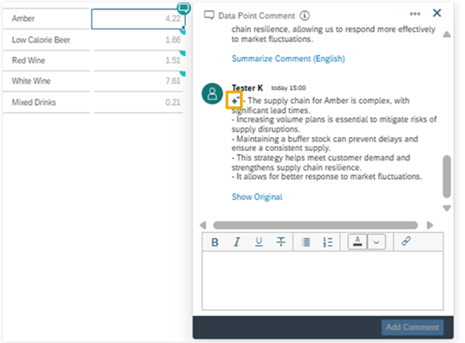
To summarize a comment, select the widget in the corresponding data cell to open the comment dialog. Find the comment you want to summarize and select Summarize Comment (English) right below it. When the summarizing process is complete, the summary in the selected data access language appears in place of the original comment. An AI icon (highlighted in yellow), at the beginning of the summary indicates that this was generated by AI. To switch to the original comment, select Show Original shown below the summary. To switch back to the summary, simply select Show Summary (English) shown below the original comment that already has had a summary.
Impact: Organizations report an 80% reduction in time spent reviewing and synthesizing collaborative feedback, allowing teams to move from discussion to action faster than ever.
AI-Assisted Data Actions: Scripting Made Simple
Data actions enable users to write back to planning models, trigger workflows, and automate processes. Traditionally, creating these actions require scripting knowledge, a barrier for many business users.
AI-Assisted Data Actions eliminate this barrier by:
- Natural Language Script Generation: Describe what you want your data action to do, and AI generates the advanced formula script automatically. For example: “Copy actual values from last year to this year’s budget and increase by 5%” becomes executable code instantly.
- Script Documentation: Upload existing scripts and receive plain-language explanations of what they do, perfect for understanding legacy code or onboarding new team members.
- Iterative Refinement: Modify scripts through conversation: “Now add a condition to only update values greater than zero.”
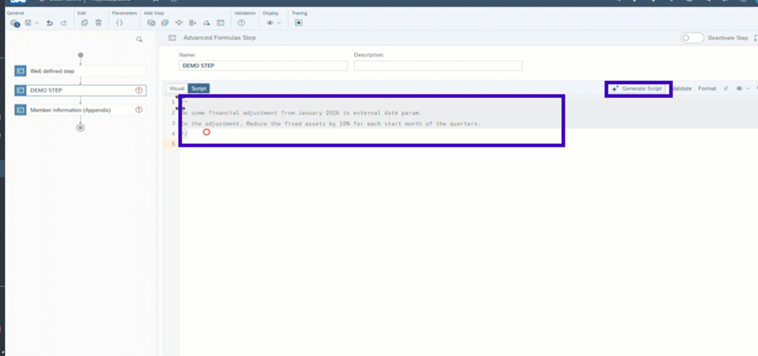
Generate Advanced Formulas Script from a comment.
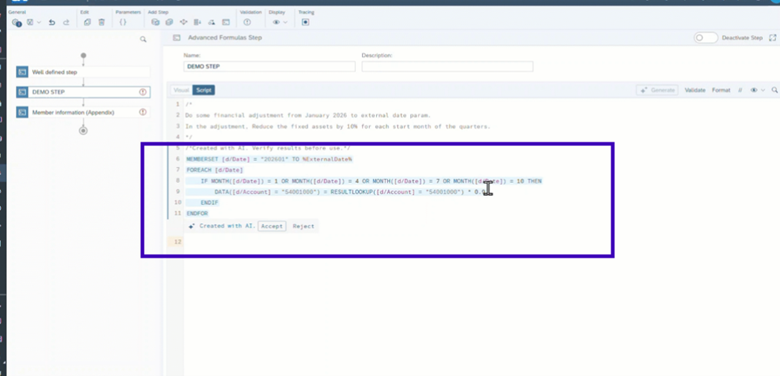
AI assisted Data Actions in SAC
Impact: Script authoring and documentation time reduced by 75%, enabling business analysts to create sophisticated planning workflows without extensive technical training.
AI-Assisted Calculations: Complex Formulas, Simple Requests
Financial models, predictive analytics, and business calculations often require intricate formulas that can take hours to build and debug.
AI-assisted calculations streamline this process:
- Formula Generation from Description: Tell the AI what you need to calculate, and it creates the formula syntax: “Calculate year-over-year growth rate excluding outliers” or “Weighted average based on sales volume.”
- Formula Explanation: Encounter a complex formula you don’t understand? AI breaks it down in plain language, explaining each component and its business purpose.
- Error Prevention: AI suggests corrections when formulas contain logical errors or syntax issues.
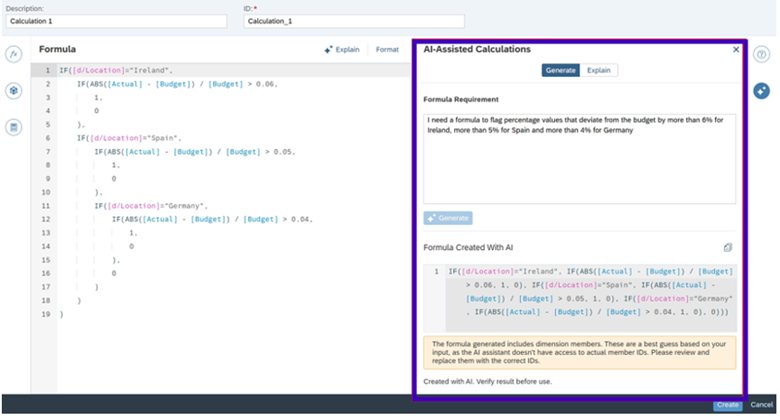
Create Calculation Using AI-Assisted Calculations Feature
Impact: 60% reduction in time required to create and validate complex calculations, with fewer errors and better formula documentation.
AI-Assisted Chart Summaries: From Visuals to Narratives
Presentations and reports require more than charts—they need narrative context that explains what the data means. Creating these summaries manually is time-consuming and often inconsistent across teams.
AI-assisted chart summaries automatically generate professional descriptions:
- Automatic Narrative Generation: Every chart can instantly receive a text summary highlighting key trends, outliers, and insights.
- Presentation-Ready Output: Summaries are formatted for inclusion in PowerPoint and other presentation tools.
- Consistent Quality: AI maintains a professional tone and consistent structure across all summaries.
- Dynamic Updates: As data refreshes, summaries automatically update to reflect current insights.
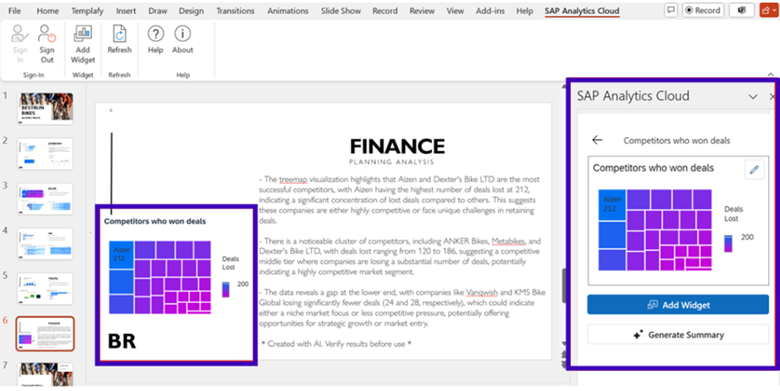
Generated a summary on a selected SAP Analytics Cloud chart with the help of generative AI.
Impact: 96% reduction in time spent writing and updating chart summaries, ensuring every visualization tells its story clearly.
User Experience: Making AI Accessible to Everyone
The most powerful AI capabilities are useless if they’re too complex for business users to adopt. SAP Analytics Cloud prioritizes user experience, ensuring that AI enhances rather than complicates the analytics journey.
Intuitive Visual Experience
Recent improvements have delivered a more responsive and engaging interface:
- Faster Loading: Stories and dashboards load significantly faster, reducing wait times.
- Smooth Animations: Chart transitions and data updates are fluid and professional.
- Clear Storytelling: Enhanced visualization options make it easier to communicate insights without technical skills.
Low-Code/No-Code Environment
AI capabilities are designed for business users, not just data scientists:
- Conversational Interfaces: Natural language eliminates the need to learn query languages.
- Guided Workflows: AI provides suggestions and next-best actions throughout the analytical process.
- Template-Based Creation: Pre-built templates with embedded AI accelerate time-to-value.
- Context-Aware Assistance: Joule understands what you’re trying to accomplish and offers relevant help.
Breaking Down Language Barriers
Global organizations face the challenge of language diversity. SAP Analytics Cloud addresses this through:
- Multi-language AI Interaction: Query data and receive insights in dozens of languages.
- Automatic Translation: Comments, summaries, and documentation translate in real-time.
- Localized Business Logic: AI understands regional business terminology and conventions.
The result is true democratization of analytics—where anyone in your organization, regardless of technical background or language, can extract insights from data.
Business Benefits and ROI: Quantifying the Impact
The true measure of any technological investment is its business impact. Organizations leveraging AI capabilities in SAP Analytics Cloud report significant, measurable benefits.
Productivity Gains
| Workflow | Traditional Approach | AI-Powered Approach |
| Script Authoring | Manual coding with testing | Natural language generation |
| Comment Management | Read all threads individually | AI summarization |
| Chart Documentation | Write descriptions manually | Auto-generated summaries |
| Formula Creation | Build and debug complex formulas | Describe in plain language |
| Report Generation | Assemble insights manually | AI-assisted narrative creation |
Strategic Benefits
Organizations benefit from AI-powered analytics through four key improvements: faster decision-making with insights delivered in minutes instead of days and reduced reliance on specialized analysts; increased adoption as more users engage with self-service analytics, reducing IT bottlenecks while improving organizational data literacy; better collaboration enabled by AI-generated summaries that create shared understanding across cross-functional and global teams; and enhanced quality through fewer calculation errors, consistent analytical approaches, and improved documentation of analytical processes.
Getting Started: Best Practices for Just Ask Prompts
Ready to leverage AI in your SAP Analytics Cloud environment? Follow these practical steps for successful implementation.
Prompt Engineering Basics
Getting the best results from AI requires effective prompts. Train users on these principles:
- Be Specific
- Poor: “Show sales”
- Better: “Show monthly sales by region for 2024 compared to 2023”
- Provide Context
- Poor: “Calculate growth”
- Better: “Calculate year-over-year revenue growth rate excluding returns”
- Iterate and Refine
- Start with a basic request
- Review the result
- Add additional constraints or modifications
- Build complexity gradually
- Use Business Language
- Avoid technical jargon
- Use familiar terms in your industry
- Be consistent with internal nomenclature
Conclusion: Embracing the AI-Powered Analytics Future
The integration of artificial intelligence into SAP Analytics Cloud represents more than incremental improvement—it’s a fundamental transformation in how organizations interact with data and make decisions.
We’re witnessing the democratization of analytics, where insights that once required specialized expertise are now accessible to every business user. Natural language interfaces, automated content generation, and intelligent assistance are removing barriers and empowering people across organizations to work with data confidently.
The productivity gains are significant and measurable: 60–96% time savings across various workflows, faster decision-making, and reduced dependency on specialized resources. But perhaps more importantly, these AI capabilities are changing the culture around data—making analytics a natural part of every role rather than a specialized function.
As SAP continues to enhance these capabilities throughout 2025 and beyond, early adopters will gain competitive advantages in agility, insight quality, and operational efficiency. The question is no longer whether to embrace AI in analytics, but how quickly can you realize its benefits in your organization.
Connect with an SAC expert at Resolute Insights for a quick demo and discover how SAC can transform your decision-making
This blog post reflects capabilities available as of November 2025. SAP regularly releases updates and new features. Check the official SAP Analytics Cloud documentation for the latest information.